

Activities with actual dates later than the data date
Activities with actual dates later than the data date
Introduction

In Primavera P6, the Data Date represents the time boundary up to which actual progress has been updated. Everything that happened before that date may be part of the actual record of the schedule; everything from that date onward belongs to the planned future.
For this reason, an activity should not have actual start or actual finish dates equal to or later than the Data Date. If this happens, the schedule is showing actual events in a period that should not yet contain recorded progress.
xerPlanner identifies activities that have an actual start date or an actual finish date equal to or later than the Data Date, considering the scope selected for the report. This condition represents a clear inconsistency in the schedule update process and should be carefully reviewed.
Why this condition is a problem
The Data Date marks the exact point up to which the project’s actual status is known. If an activity has an actual date equal to or later than that point, the schedule is reporting something as actual even though, according to its own Data Date, it belongs to the future or to the exact boundary from which new actual events should not be recorded.
The following screenshot shows an example of an activity with actual dates that are inconsistent with the project Data Date. This type of condition may look like a minor data entry issue, but it directly affects the reliability of the updated schedule.
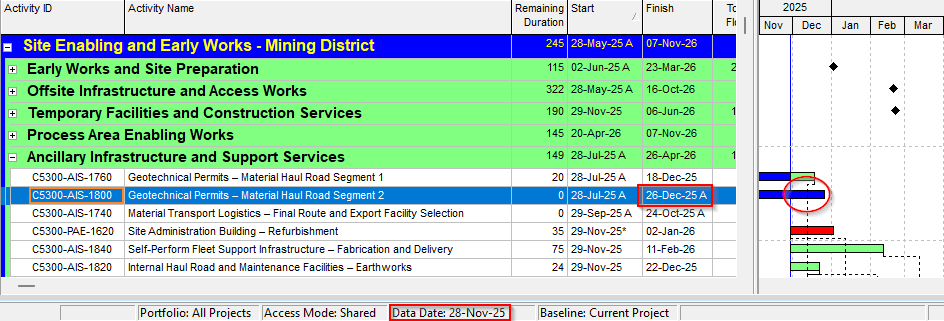
This inconsistency can create several problems:
- distortion of the actual project status;
- loss of confidence in the update process;
- differences between reported progress and the actual control period;
- errors in the interpretation of started or finished activities;
- issues during quality reviews, audits, or forensic schedule analysis;
- technical weakness in potential claims or impact analysis.
The core question is simple: if the Data Date defines up to which point actual progress is known, how can there be an actual date equal to or later than that point? In that case, either the actual date was entered incorrectly, or the Data Date does not correctly represent the control date used for the update.
How xerPlanner interprets this finding
xerPlanner reports activities that meet one of the following conditions:
- they have an actual start date equal to or later than the Data Date; or
- they have an actual finish date equal to or later than the Data Date.
The analysis compares the activity’s actual dates against the project Data Date. In the Primavera P6 database, this date corresponds to the field associated with the project’s last recalculation date, which xerPlanner uses as the Data Date reference.
The report shows the affected activity, its remaining duration, its remaining labor units, its actual start date, its actual finish date, and the project Data Date. With this information, the planner can quickly determine whether the issue is related to the actual date, the activity status, or the Data Date used for the schedule update.
Importance of the selected scope
This analysis may return different results depending on the scope selected for the report. If the user selects a scope focused only on remaining activities, few findings may appear, because many inconsistencies related to actual dates are found in activities that were already started or finished during the update process.
In that case, xerPlanner may detect in-progress activities with an actual start date equal to or later than the Data Date, but completed activities with actual finish dates inconsistent with the cutoff date may be excluded.
For this reason, if the objective is to review the quality of the schedule update, this analysis should be applied to a scope that also includes completed activities. Otherwise, the report may underestimate the actual number of inconsistencies related to actual dates outside the control period.
This consideration is especially important because this type of finding usually originates during the schedule update process. In other words, it is not always found in the remaining work, but in the actual information recorded to represent progress for the period.
Impact on audits, forensic analysis, and claims
This finding is especially sensitive because it is easy to detect and difficult to justify. In an audit or forensic schedule analysis, actual dates equal to or later than the Data Date may be interpreted as a sign of weakness in the update process.
In claims, time extension requests, or impact analysis, the reliability of actual dates is essential. If the schedule contains actual dates that are not consistent with its own Data Date, the traceability of progress is weakened, and the quality of the information used to support contractual conclusions may be questioned.
For this reason, this finding should not be treated as a minor detail. Although it is usually easy to correct, leaving it unresolved on a recurring basis can seriously affect the credibility of the schedule and the project control process.
Best practices
The best practice is to clearly define a control date for each update period and record only the actual progress that occurred before that date. The Data Date should consistently represent the boundary of the reporting period.
Before closing a schedule update, it is recommended to verify that no activity has actual dates equal to or later than the Data Date. If an inconsistency is found, the actual date should be corrected, the Data Date should be adjusted if appropriate, or the update procedure should be reviewed.
It is also recommended to run this analysis with a sufficiently broad scope when the objective is to validate the quality of the schedule update. Reviewing only remaining work may be useful for certain controls, but it is not always enough to detect actual date errors in activities that have already been completed.
A disciplined update process should include progress collection, validation of actual dates, activity updates, schedule recalculation, and inconsistency review before reports are issued. This simple control can prevent errors that may later have a significant impact on audits, performance analysis, or claims.
Conclusion
Activities with actual dates equal to or later than the Data Date represent a direct inconsistency in the schedule update. The Data Date defines up to which point actual progress is known; therefore, actual events should not be recorded from that point onward.
This analysis should be interpreted considering the scope selected for the report. If only remaining activities are reviewed, completed activities with inconsistent actual dates may be excluded. Therefore, when the objective is to evaluate the quality of the update, it is advisable to include the updated portion of the schedule as well.
Correcting this finding helps preserve the schedule’s time consistency, improves the credibility of the update process, and reduces risks in audits, forensic analysis, and potential claims. It is a simple but essential review to ensure that the schedule accurately reflects the project’s actual status.