

Activities with non-labor hours without a non-labor resource assigned
Activities with non-labor hours without a non-labor resource assigned
Introduction

In Primavera P6, activities can store non-labor units related to equipment, machinery, or other resources that do not represent direct labor. These units are important for analyzing equipment usage, building resource load curves, reviewing operational needs, and evaluating how non-labor resources are distributed over time.
However, for these units to be properly analyzed from a resource perspective, it is not enough for the activity to contain non-labor values. The activity should also have at least one non-labor resource assigned. If this is not the case, the schedule may show non-labor units in the activity view, but those units may not be properly reflected in the resource assignment view.
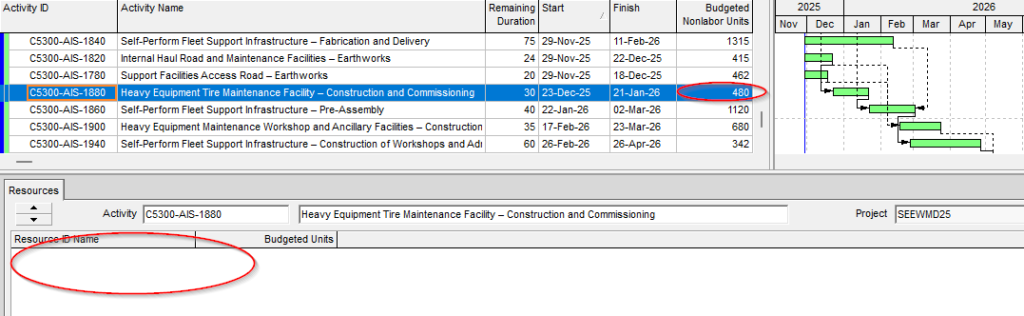
xerPlanner identifies activities that have actual or remaining non-labor units recorded but do not have any assigned non-labor resource. This condition can create differences between the values shown at activity level and the values available for analysis by equipment, machinery, resource type, area, or work front.
Why this condition can create inconsistencies
When an activity has non-labor units but no non-labor resources assigned, the schedule may still show values in certain activity columns. This can give the impression that the schedule contains enough information to analyze equipment or machinery workload.
The issue appears when the same information is reviewed through resource assignments, resource layouts, equipment curves, or resource-based reports. In those cases, the units may not be available with the required level of detail, because there is no non-labor resource that allows the workload to be properly distributed, classified, or grouped.
The following screenshot shows an example of an activity with non-labor units recorded but without a consistent non-labor resource assignment. This type of situation can create differences between what is shown in the activity view and what is obtained when analyzing resource assignments.
This can affect:
- equipment usage curves;
- review of machinery requirements by period;
- equipment availability planning;
- traceability between activities, resources, and costs;
- consistency between activity reports and assignment reports;
- interpretation of actual or remaining workload.
For example, a schedule may show a significant amount of non-labor units distributed across several months. But if those units are not supported by non-labor resource assignments, the analysis can only be performed at activity level, not at equipment or machinery level. This limits the ability to understand which resources perform the work, which equipment carries the workload, and how its usage is distributed over time.
How xerPlanner interprets this finding
xerPlanner reports activities that have actual or remaining non-labor units different from zero but do not have any assigned non-labor resource.
The analysis focuses on activities that are not completed, because the purpose is to warn about conditions that may still affect current planning, control, or reporting.
The report shows the affected activity together with its budgeted, remaining, and actual non-labor units. This allows the reviewer to understand the full context of the finding and determine whether the issue mainly affects remaining work, recorded progress, or both.
Cases that require careful interpretation
This finding does not necessarily mean that the activity was incorrectly built. In some schedules, non-labor units may have been loaded directly into the activity due to a methodological decision, an import from another system, or an internal planning practice.
However, even when this practice is intentional, it should be reviewed carefully. If the schedule will be used for equipment curves, availability analysis, machinery-based reporting, cost control, or integration with other systems, the absence of non-labor resources may lead to incomplete or inconsistent interpretations.
The key point is not to label the condition as an error, but to warn about a situation that may create misunderstandings. One person may review the activity view and conclude that the schedule has non-labor units properly loaded, while another person may review the resource view and find a lower, incomplete, or unclassifiable workload.
Best practices
The best practice is for non-labor units to be supported by non-labor resource assignments on the corresponding activities. This allows the workload to be analyzed both from the activity perspective and from the resource perspective.
Before correcting the finding, it is important to review whether the actual, remaining, or budgeted units were entered manually, imported from another system, or generated by a previous schedule configuration. If correction is required, appropriate non-labor resources should be assigned and the units should be checked after the adjustment.
It is also recommended to verify that non-labor resources are properly classified by equipment type, discipline, contract, area, work front, or any other relevant project control criterion. This way, resource curves will show not only the total workload, but also a meaningful distribution for decision-making.
Conclusion
Activities with non-labor units recorded but no assigned non-labor resources can create important differences between the information visible in the activity view and the information available through resource assignments. Although this condition does not always represent an error, it can affect the quality of equipment analysis, usage curves, availability planning, costs, and reporting.
A reliable schedule should explain not only how many non-labor units an activity requires, but also which resources perform that work. Reviewing and correcting these situations improves schedule traceability and reduces the risk of inconsistencies in project resource analysis.