

Activities with duplicate resource assignments
Activities with duplicate resource assignments
Introduction

In Primavera P6, an activity can have resource assignments to represent labor hours, equipment, materials, or other components required to perform the work. These assignments support the calculation of units, costs, resource curves, and time-phased resource requirements.
However, when the same resource is assigned more than once to the same activity, the schedule can become confusing and difficult to interpret. In some cases, this may be caused by a loading error, an accidental duplication during import, an incorrect manual edit, or an inconsistency inherited from a previous schedule version.
xerPlanner identifies activities where the same resource is repeated within the same activity, provided that those assignments have budgeted, remaining, or actual units. The purpose is not to assume that the schedule is automatically wrong, but to flag a condition that should be reviewed before using the file for resource analysis, cost analysis, or future imports.
Why duplicated resources can be a problem
A duplicated resource assignment can directly affect how the activity’s units and costs are interpreted. If a resource appears twice, the units may be split between both lines, duplicated by mistake, or distributed in a way that is not clear to the schedule reviewer.
The following screenshot shows an example of an activity in Primavera P6 where the same resource is assigned more than once. Although it may look like a simple condition, this duplication can affect the interpretation of units, costs, and schedule consistency when the file is reviewed or imported into another database.
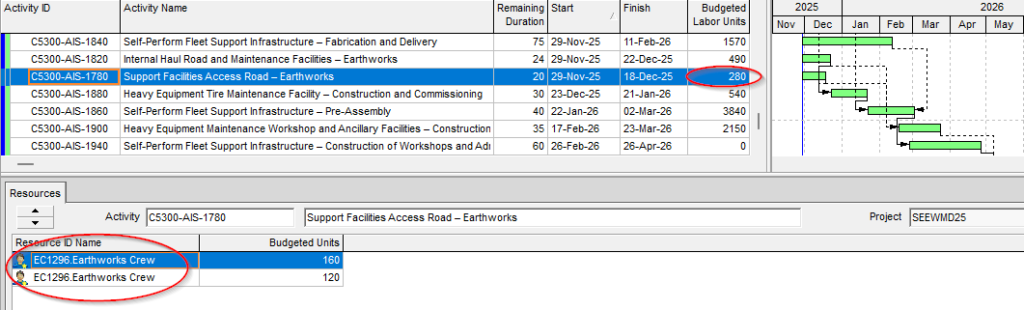
This can create several issues:
- Resource curves may be higher or lower than expected.
- Labor or equipment budgets may become harder to validate.
- Costs may be calculated in a less transparent way.
- Comparisons against external reports may become confusing.
- Loss of assignments when importing the XER file into another Primavera P6 database, since in some verified versions only the first assignment of the repeated resource is preserved.
The issue is not only that the resource appears twice, but that it is not always clear whether the repetition was intentional, accidental, or caused by a previous import process.
How xerPlanner interprets this finding
xerPlanner reports an activity when the same resource is assigned more than once to that activity.
To avoid irrelevant findings, the analysis only considers assignments where at least one of the following values is different from zero:
- budgeted units;
- remaining units;
- actual units.
This prevents empty duplicated assignments from being reported when they have no practical impact on resource or cost analysis.
The report shows the affected activity, the repeated resource, the accumulated remaining units, and the number of times the resource appears assigned. This allows the planner to decide whether the assignments should be consolidated, one line should be removed, or the duplication should remain because there is a clear technical justification.
Cases that require careful interpretation
Not every duplicated assignment should be corrected automatically without review. In some schedules, the planning team may have used repeated assignments to represent specific conditions, although this practice is generally not recommended because it reduces traceability.
For example, a duplicated assignment may exist due to differences in costs, cost accounts, curves, roles, planned dates, or other assignment-level attributes. Even so, when the same resource appears more than once on the same activity, the schedule should be reviewed carefully to confirm that the structure was intentional and does not distort the reports.
Special care should also be taken when importing XER files with this condition. In some verified versions of Primavera P6, when an activity contains the same resource assigned more than once, the XER import process keeps only the first assignment of that resource and discards the others. This creates a real difference between the exported schedule and the imported schedule, affecting units, costs, and resource curves.
For this reason, when xerPlanner detects duplicated resources, it is recommended to review and correct the condition before using the file as a backup, contractual deliverable, or migration baseline.
Best practices
The best practice is to keep only one assignment per resource within each activity, unless there is a clear technical reason to do otherwise and that reason is documented.
Before correcting the finding, the budgeted, remaining, and actual units of each repeated line should be reviewed. If the duplication was accidental, the information should be consolidated into a single assignment and unnecessary lines should be removed. If actual units have already been recorded, the correction should be handled carefully to avoid altering historical progress information.
It is also important to identify whether the duplication came from an import, a bulk update, an integration with another system, or a manual edit. If the root cause is not corrected, the issue may reappear in future schedule versions.
Conclusion
Activities with duplicate resource assignments can create significant complications in your project schedule, leading to inaccurate resource planning and potential project delays. By identifying and correcting these duplicates, you can maintain an accurate and efficient project plan. Regular monitoring and best practices in resource management will help keep your project on track and ensure that all resources are used effectively.