

Activities with duplicate names within the same WBS
Activities with duplicate names within the same WBS
Introduction

Clarity in activity names is a basic element for a schedule to be properly understood, reviewed, and used. Although Primavera P6 identifies each activity through a unique Activity ID, the activity name remains a key reference for users, reviewers, contractors, control teams, and execution stakeholders.
In xerPlanner, this analysis identifies activities that have the same name within the same WBS level. This situation may seem minor, but it can create confusion when two or more nearby activities within the schedule structure describe the work in the same way.
A duplicate name does not automatically mean that there is a planning error. However, it does indicate that the schedule should be reviewed to confirm whether the activities represent different work and whether their names allow them to be clearly distinguished.
The impact of activities with duplicate names
When two or more activities within the same WBS have the same name, schedule traceability is reduced. Although their Activity IDs are different, users may have difficulty quickly identifying what each activity represents, especially in reports, progress meetings, filters, groupings, or schedule reviews.
This duplication can affect team communication. For example, if two activities within the same WBS are both named Install equipment, it may not be clear whether they correspond to different areas, phases, systems, disciplines, or work fronts. This forces users to review additional information to understand the difference between them.
It may also increase the risk of errors in planning and control. An activity could be updated, commented on, reported, or analyzed incorrectly if its name does not allow it to be distinguished from another similar activity. In large projects, where multiple users and contractors participate, this ambiguity may cause wasted time and interpretation errors.
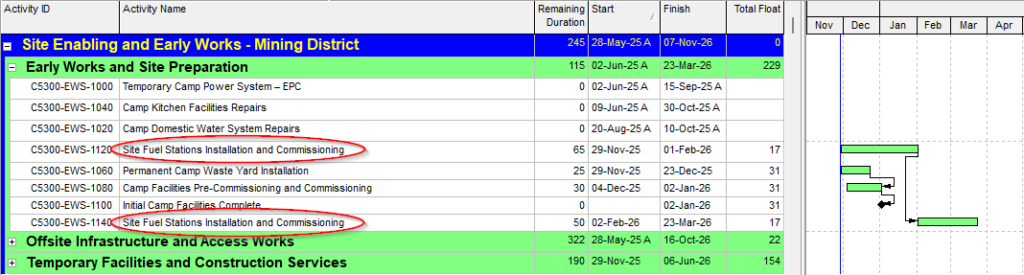
The following image shows an example of activities located within the same WBS with repeated names. Although each activity has a different identifier, the repeated name makes it harder to quickly recognize the specific work represented by each one.
Cases that should be interpreted carefully
Not every duplicate name necessarily represents a critical problem. In some cases, there may be a valid reason to repeat names, especially when the Activity ID, Activity Codes, or other schedule fields provide enough additional context.
However, within the same WBS, exact name repetition is usually a sign of low clarity. If the activities represent different work, their names should indicate that difference. If they do not represent different work, then there may be an actual activity duplication that should be reviewed.
It is also important to consider that this analysis focuses on activities with the same name within the same WBS. Activities with similar names in different WBS branches do not necessarily represent a problem, because the WBS itself may provide the context needed to distinguish them.
Best practices for managing duplicate names
To properly manage this type of finding, the first step is to review whether the duplicated activities actually represent different work. If they represent different work, their names should be modified to include the element that distinguishes them.
In practical terms, the review should consider at least the following:
- Confirm whether the activities with duplicate names actually belong to the same WBS.
- Review whether they represent different work or whether there is an actual activity duplication.
- Add distinguishing information to the name, such as location, phase, system, discipline, work front, level, area, or deliverable.
- Verify that the name is understandable for users who did not participate in the original schedule development.
- Avoid overly generic names that do not describe the real scope of the activity.
- Maintain a consistent naming convention throughout the schedule.
For example, instead of repeating the name Install equipment, clearer names could be Install equipment – Grinding area, Install equipment – Crushing area, or Install equipment – Line 1, depending on the project context.
Conclusion
Activities with duplicate names within the same WBS can affect schedule clarity, traceability, and usefulness. Although the Activity ID technically distinguishes each activity, the name remains an essential reference for interpreting the planned work and communicating project progress.
In xerPlanner, this analysis helps identify potential ambiguities within the WBS structure. Reviewing and correcting these cases improves schedule readability, reduces interpretation errors, and facilitates follow-up by all users involved.