

Activities without predecessors
Activities without predecessors
Introduction

One of the key elements of a reliable schedule is ensuring that its activities are integrated into a coherent logic network.
In general terms, an activity without predecessors is an activity that does not have a prior logical relationship controlling its start or finish.
In xerPlanner, this analysis focuses on activities within the analyzed project that do not have internal predecessors. This means that an activity may appear as a finding even if it has a relationship with an external activity belonging to another project included in the XER file.
This is a preventive criterion. If the schedule is later imported into a Primavera P6 database where those external projects do not exist, those relationships may not be available, and the activity would effectively remain without predecessors within the project’s logic network.
When xerPlanner identifies that an activity reported as a finding may be related to external activities, it marks it with “[e]” before the Activity ID. This mark indicates that the case should be reviewed together with the external relationships section of the report, since the finding may depend on the context in which the XER file will be imported or reviewed.
The impact of activities without predecessors
When an activity does not have internal predecessors, it may be weakly integrated into the logical flow of the schedule. This can create uncertainty about when it should start or finish, what prior condition enables its execution, and how it relates to the rest of the planned work.
In a well-structured schedule, activities should not behave as isolated elements. Each activity should be part of a logical sequence that represents the project’s execution strategy. If an activity has no predecessors, it may start before the necessary prior work is completed, create interferences with other activities, or affect the correct interpretation of the critical path.
The absence of predecessors may also distort the schedule analysis. An activity without prior logic may show apparently valid dates, but those dates may not be supported by a constructive, contractual, or technical sequence. This reduces the reliability of the schedule as a tool for planning, control, and decision-making.
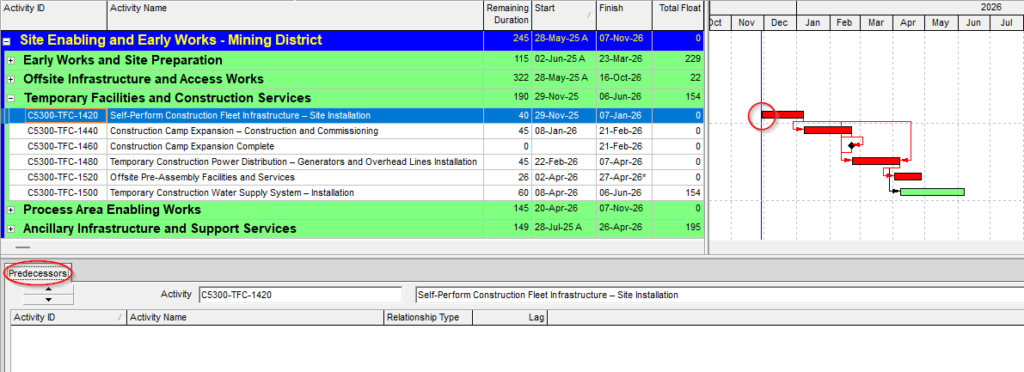
The following image shows an example of an activity that does not have an internal predecessor relationship within the analyzed project. Although it may visually appear to be part of the schedule, the absence of a prior logical relationship reduces the reliability of the network and should be reviewed.
Cases that do not necessarily represent an error
Not every activity without predecessors should be corrected automatically. In many schedules, it is valid to have a single project start milestone without predecessors, from which the first activities of the project are logically derived. This milestone represents the logical starting point of the schedule and therefore should not be treated as an inconsistency.
There may also be start milestones without predecessors that were intentionally configured with an “As Late As Possible” constraint. In some schedules, these milestones are used as logical markers or flags associated with the start of a successor activity. In that case, the milestone does not need a predecessor activity to drive it, because its date is determined by its relationship with the activity that follows it.
However, this condition is only defensible if the milestone has at least one successor. If a milestone without predecessors and with an “As Late As Possible” constraint also has no successors, it no longer fulfills that logical function and should be reviewed as a potentially isolated activity within the schedule.
WBS Summary activities are also not considered findings in this analysis. This type of activity can work correctly without its own logic relationships, because its start and finish dates are automatically adjusted based on the activities contained within the corresponding WBS.
There may also be cases where an activity has an external predecessor. In that situation, the finding must be interpreted carefully. If the external project exists in the same database where the schedule will be used, the relationship may remain valid. However, if the XER file is imported into a database where that external project does not exist, the relationship may not be available, and the activity would effectively remain without internal predecessors.
For this reason, xerPlanner does not automatically discard these cases. Instead, it reports them preventively and allows the user to review the details of external relationships in the corresponding section of the report.
Best practices for managing activities without predecessors
To properly manage this type of finding, the first step is to review whether the activity should actually depend on a prior condition within the project. If the activity represents executable work, it should normally be linked to a previous activity, a valid start milestone, or a logical sequence that explains when it becomes available for execution.
It is also recommended to check whether the finding is marked with “[e]”. If it is, the external relationships section should be reviewed to identify the related external project and activity. With that information, the user can determine whether the relationship will remain valid in the environment where the schedule will be used.
In practical terms, the review should consider at least the following:
- Confirm whether the activity is part of the actual project work or whether it is a summary element.
- Verify whether it should be linked to a start milestone, a previous activity, or a contractual or technical condition.
- Check whether the activity depends only on external relationships.
- Evaluate whether those external relationships will be available when importing the XER file into another Primavera P6 database.
- Correct the internal logic when the activity should be connected to the project’s network.
By applying these reviews, the schedule gains logical coherence and reduces the risk of certain activities becoming disconnected when imported, reviewed, or used in another Primavera P6 environment.
Conclusion
Activities without predecessors can affect schedule reliability when they represent work that should be controlled by previous activities, milestones, or other internal logic relationships. Their presence can create uncertainty about the real execution sequence, weaken the critical path analysis, and reduce the usefulness of the schedule as a control tool.
In xerPlanner, this analysis is applied with a preventive criterion. WBS Summary activities are excluded, the valid project start milestone is not considered a finding, and activities that depend on external relationships may be marked with “[e]” to warn that their condition should be reviewed according to the XER file import context.
Reviewing and correcting these cases helps strengthen the schedule logic network, improve traceability, and reduce risks when working with files coming from different Primavera P6 databases.
In addition, some milestones without predecessors may be acceptable when they function as logical markers with an “As Late As Possible” constraint and have successors that give them meaning within the network.