

Activities with absolute constraints
Activities with absolute constraints
Introduction

In a schedule developed with Primavera P6, activity dates should mainly result from logic relationships, calendars, durations, and the natural behavior of the CPM model. The more the schedule depends on properly built logic relationships, the more useful it becomes for planning, control, and impact analysis.
However, there are cases where an activity has a specific start or finish date imposed on it. In xerPlanner, these are classified as absolute constraints, because they establish a single fixed date for the activity and may affect the natural interpretation of logic, float, and criticality within the schedule.
This analysis identifies activities with primary absolute constraints, specifically:
- Mandatory Start
- Mandatory Finish
- Start On
- Finish On
Although these constraints do not behave exactly the same way, they all share one key characteristic: they introduce a specific and inflexible date. For this reason, xerPlanner analyzes them separately from window constraints, which allow some time flexibility on one side of the defined date.
Primavera P6 does not have secondary absolute constraints; secondary constraints correspond to window constraints. Therefore, this analysis focuses only on primary absolute constraints.
The impact of absolute constraints
Absolute constraints can affect schedule quality because they introduce an imposed date over the natural logic of the network. This may cause an activity to be placed on a specific date not necessarily because the logic sequence led it there, but because a constraint is controlling its start or finish.
Mandatory Start and Mandatory Finish are the most rigid constraints, since they directly impose a required start or finish date. These constraints can dominate the activity logic and affect how dates and float are calculated.
On the other hand, constraints such as Start On and Finish On may still allow the logic to have some effect when there is a conflict, but they also establish a specific date that can impact float, criticality, or the predecessor chain. For this reason, xerPlanner also considers them absolute constraints from an analytical perspective.
The main issue is not that an absolute constraint is always wrong. There may be a contractual, technical, operational, or strategic reason to impose a specific date. The risk appears when these constraints are used to force the schedule instead of correcting the logic that should naturally explain that date.
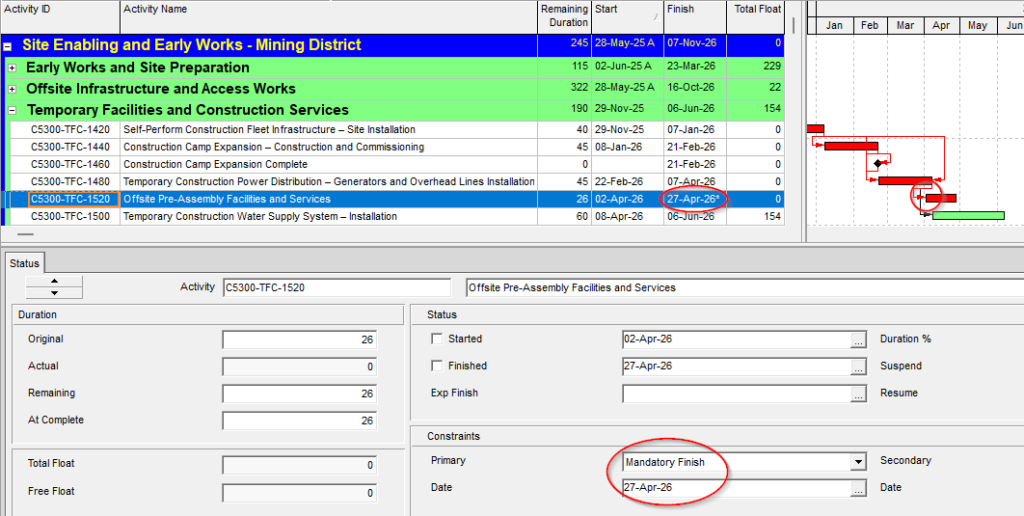
The following image shows an activity with a Mandatory Finish constraint, where the activity finish is associated with a specific date. This type of configuration may be valid if it responds to a real project condition, but it should be reviewed because it can directly affect float, criticality, and the logical interpretation of the schedule.
Difference from window constraints
Absolute constraints establish a single fixed date. Window constraints, on the other hand, define a time limit while allowing the schedule logic to move more freely on one side of that date.
For example, a Start On or After constraint establishes that an activity cannot start before a certain date, but it may start later if the schedule logic determines so. Similarly, a Finish On or Before constraint establishes a latest finish limit, but allows the activity to finish earlier if the logic allows it.
This difference is relevant for schedule quality analysis. Absolute constraints tend to impose a specific date, while window constraints act as limits. No type of constraint should be used without justification, but absolute constraints usually require stricter review because they reduce the ability of the logic network to calculate dates naturally.
Cases that should be interpreted carefully
An absolute constraint should not automatically be interpreted as an error. In some projects, it may be necessary to fix a date due to contractual requirements, commitments with third parties, operational windows, regulatory milestones, restricted access, critical deliveries, or other conditions external to the schedule.
However, these constraints must be justified. If they are used only to make the schedule “fit” a desired date, they may hide logic issues, create artificial float behavior, or distort the critical path.
It is also important to distinguish between a target date and an absolute constraint. If an activity needs to be monitored against a committed date, it may be more appropriate to use milestones, baselines, custom fields, codes, or reports instead of imposing a constraint that changes the calculation behavior.
From a schedule quality perspective, an absolute constraint should respond to a real project condition and not to a manual date correction.
Best practices for managing absolute constraints
To properly manage this type of finding, the first step is to review why the constraint was applied and whether there is a valid justification for keeping it.
In practical terms, the review should consider at least the following:
- Confirm whether the constraint responds to a contractual, technical, operational, or external project requirement.
- Verify whether the imposed date could be obtained through properly built logic relationships.
- Review whether the constraint is affecting total float, criticality, or the project critical path.
- Evaluate whether the constraint is hiding a weakness in the logic sequence.
- Explicitly document the justification when the constraint must remain.
- Replace the constraint with logic relationships when the date can be explained through real dependencies.
- Use milestones, baselines, or other control mechanisms when the objective is only to monitor a target date.
By applying these reviews, the schedule maintains more reliable logic and reduces the risk of having dates depend on unjustified manual impositions.
Conclusion
Absolute constraints can have a significant impact on schedule quality because they fix specific start or finish dates that may affect float, criticality, and the natural interpretation of the logic network.
In xerPlanner, this analysis identifies activities with primary absolute constraints: Mandatory Start, Mandatory Finish, Start On, and Finish On. These constraints differ from window constraints because they do not only establish a flexible limit, but a specific date that should be carefully reviewed.
Reviewing these constraints helps distinguish between truly justified project conditions and manual adjustments that may weaken the schedule logic. When an absolute constraint is not properly justified, the recommended action is to correct the schedule logic instead of forcing its dates.