

Activities with open ends
Activities with open ends
Introduction

Maintaining coherent logic relationships between activities is essential to ensure that the schedule correctly represents the project execution sequence. However, there are cases where an activity may have successors and still have an open finish.
In practical terms, an activity with an open finish is not necessarily an activity without successors.
It is an activity that, although it has following relationships within the schedule, does not have a successor that effectively depends on its finish through a Finish to Start (FS) or Finish to Finish (FF) relationship.
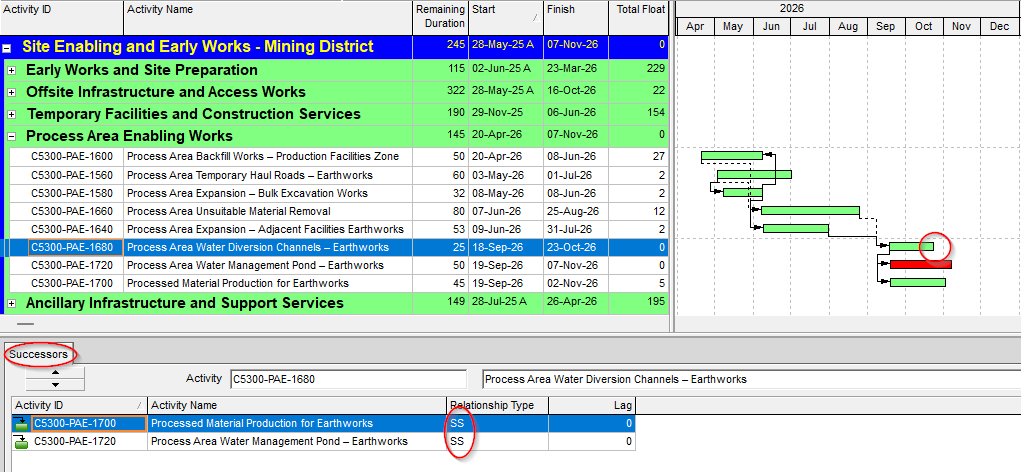
In xerPlanner, this analysis identifies activities within the analyzed project that have at least one internal successor, but no internal FS or FF relationship. This means that the activity may be linked through Start to Start (SS) or Start to Finish (SF) relationships, but those relationships do not directly control its finish.
This criterion helps detect activities whose finish may be weakly controlled within the project’s logic network. If the finish of an activity does not affect the start or finish of another activity, the activity may extend without impacting the logical continuity of the schedule.
When xerPlanner identifies that an activity reported as a finding may be controlling external FS or FF relationships, it marks it with “[e]” before the Activity ID. This mark indicates that the case should be reviewed together with the external relationships section of the report, since the finding may depend on the context in which the XER file will be imported or reviewed.
The impact of open-ended activities
Activities with open finish may affect schedule reliability because they allow an activity to finish without a sufficiently clear internal logical consequence. Although the activity may have successors, if those successors do not depend on its finish, the completion of the activity may remain exposed to incorrect interpretations.
For example, an activity may have a Start to Start relationship with another activity. That relationship may coordinate the start of both activities, but it does not necessarily require the first activity to finish in order to enable or control a following activity. In that case, the activity has successors, but its finish remains open.
This can create problems in project planning and control. An activity with an open finish may be extended without directly affecting the logic network, which may hide real impacts on deliverables, subsequent phases, or control milestones. As a result, the schedule may show weaker logical continuity than it appears at first glance.
The impact may also affect critical path analysis and float interpretation. If the finish of an activity is not properly controlled within the network, the schedule may allow unrealistic scenarios, reducing its usefulness as a tool for control and decision-making.
The following image shows an example of an activity that has following relationships, but whose finish does not directly control the start or finish of another activity through an FS or FF relationship. This condition allows the activity to extend without affecting the logical continuity of the schedule and should be reviewed.
Cases that should be interpreted carefully
Not every activity with an open finish necessarily represents an error, but it should be reviewed. In some cases, the planner may have used a relationship other than FS or FF for a specific technical reason. However, if the objective was to control the finish of the activity, there should be a relationship that effectively controls that finish.
WBS Summary activities are not considered findings in this analysis. This type of activity can work correctly without its own logic relationships, because its start and finish dates are automatically adjusted based on the activities contained within the corresponding WBS.
Start milestones are also excluded from this analysis. Since they represent a starting point, their relevant logic is associated with the start, not the finish. For this reason, they should not be evaluated under the same criterion applied to executable activities or finish milestones.
There may also be activities whose finish appears open when only the internal project relationships are reviewed, but which have external FS or FF relationships. In that case, the finding must be interpreted carefully. If the external project exists in the same database where the schedule will be used, the relationship may validly control the activity’s finish. However, if the XER file is imported into a database where that external project does not exist, the relationship may not be available, and the activity would effectively remain with an open finish within the analyzed project.
For this reason, xerPlanner does not automatically discard these cases. Instead, it reports them preventively and marks them with “[e]” so the user can review the associated external relationships.
Best practices for managing open-ended activities
To properly manage this type of finding, the first step is to review whether the finish of the activity should control a following activity, a control milestone, a subsequent phase, or a project deliverable.
It is also important to identify which types of relationships the activity has. If it only has SS or SF relationships, it should be evaluated whether those relationships truly represent the intended logic or whether an FS or FF relationship is missing to control the finish.
In practical terms, the review should consider at least the following:
- Confirm whether the activity has internal successors.
- Review the logic relationship type associated with each successor.
- Verify whether there is at least one FS or FF relationship depending on the activity’s finish.
- Evaluate whether the existing SS or SF relationships are sufficient to represent the real work logic.
- Check whether the finding is marked with “[e]” and, if so, review the external relationships section of the report.
- Confirm whether the external relationships will be available when importing the XER file into another Primavera P6 database.
- Correct the internal logic when the finish of the activity should be controlled within the analyzed project.
By applying these reviews, the schedule gains logical coherence and reduces the risk of certain activities extending without a properly modeled logical consequence.
Conclusion
Activities with open finish can weaken the logical quality of a schedule when their finish does not control any relevant following relationship. Although these activities may have successors, if none of them effectively depends on their finish through an FS or FF relationship, the logic network may allow unrealistic scenarios.
In xerPlanner, this analysis is applied with a preventive criterion. It considers the internal relationships of the analyzed project, excludes WBS Summary activities and start milestones, and marks with “[e]” the cases that may be controlled by external relationships.
Reviewing and correcting these findings helps strengthen the continuity of the logic network, improve dependency traceability, and reduce risks when working with files coming from different Primavera P6 databases.