

Activities with window constraints
Activities with window constraints
Introduction

In a schedule developed with Primavera P6, activity dates should mainly result from logic relationships, calendars, and durations. However, there are constraints that allow certain time limits to be established for the start or finish of an activity.
In xerPlanner, this analysis identifies activities with window constraints. These constraints do not necessarily set a single inflexible date, but rather establish a time limit on one side of the timeline. For example, they may indicate that an activity must start on or after a certain date, or that it must finish on or before a defined date.
This analysis considers the following primary window constraints:
- Start On or Before
- Finish On or Before
- Start On or After
- Finish On or After
- As Late As Possible
Unlike absolute constraints, which impose a specific date, window constraints allow some margin for the schedule logic to operate within an allowed range. Even so, they are still constraints and should be reviewed because they may modify how Primavera P6 calculates dates, float, and criticality.
It is also important to consider that, in Primavera P6, secondary constraints correspond to window constraints. For this reason, this type of constraint should be reviewed carefully when it is used to complement or limit the behavior of an activity.
The impact of activities with window constraints
Window constraints can affect schedule quality because they introduce limits that condition the natural behavior of the logic network. Although they are more flexible than absolute constraints, they may alter the position of an activity on the timeline or modify how its float is calculated.
For example, a Start On or After constraint prevents an activity from starting before a certain date, even if the logic relationships would allow it to start earlier. In that case, the activity is held until the date imposed by the constraint. Similarly, a Finish On or Before constraint may create pressure on the network if the schedule logic pushes the activity finish beyond the defined limit.
The As Late As Possible constraint has a particular behavior, as it schedules the activity as late as possible without delaying its successors or affecting the project finish. Although it does not set a specific date, it may consume float and modify the natural interpretation of the logic sequence. For this reason, xerPlanner also includes it in this analysis.
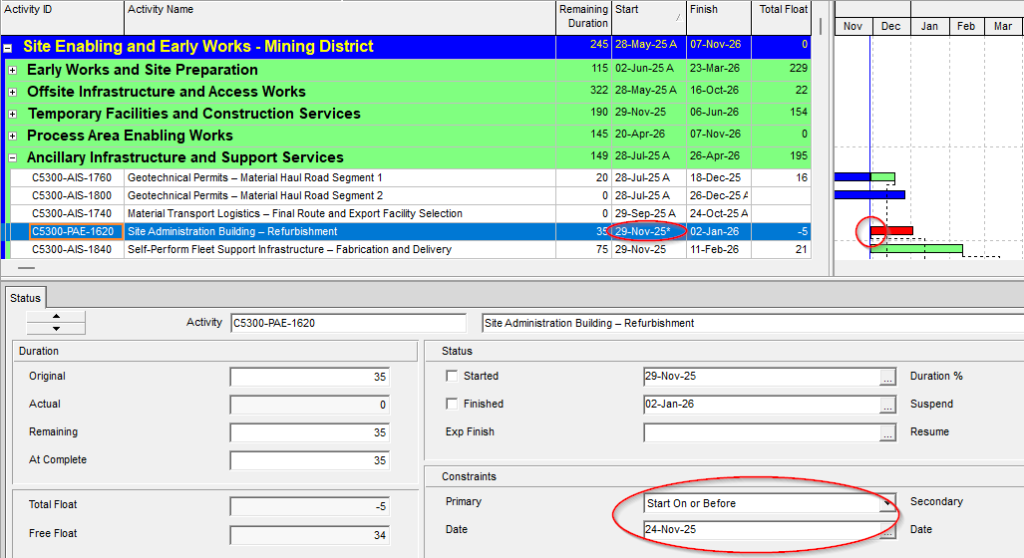
The following image shows an activity with a window constraint applied. This type of configuration may be valid if it responds to a real project condition, but it should be reviewed because it may influence scheduling, float, and the logical interpretation of the schedule.
Cases that should be interpreted carefully
The fact that xerPlanner reports an activity with a window constraint does not automatically mean that there is an error. The finding indicates that there is an imposed condition on the activity and that it should be reviewed to confirm whether that condition is justified, documented, and correctly modeled.
Window constraints may be valid when they represent real external limits, such as access dates, area availability, equipment deliveries, operational windows, permits, approvals, or contractual restrictions. In those cases, the constraint may reflect a valid project condition and not necessarily a schedule deficiency.
A particular case is procurement milestones called RAS (Required At Site). In many schedules, these milestones are intentionally configured with an As Late As Possible constraint, because they represent the latest date on which a supply must be available on site before the first construction activity that requires it can start. In those cases, the constraint may be part of a valid modeling strategy.
For this reason, xerPlanner automatically excludes from the analysis activities with an As Late As Possible constraint whose name contains the expression RAS. This exclusion helps avoid unnecessary findings in typically acceptable cases. However, if the milestone uses another naming convention or does not contain the expression RAS, it may still appear in the report and must be manually reviewed by the user.
Best practices for managing window constraints
To properly manage this type of finding, the first step is to review whether the constraint responds to a real project condition or whether it was used to manually adjust a date that should be explained by logic relationships.
When a window constraint is used without justification, it may hide logic sequence problems or create a misleading interpretation of available float. Therefore, although these constraints are more flexible than absolute constraints, they should not be applied without a clear reason.
In practical terms, the review should consider at least the following:
- Confirm which type of window constraint is applied to the activity.
- Verify whether the constrained date responds to a real project condition.
- Review whether the logic relationships could explain the date without imposing a constraint.
- Evaluate whether the constraint is affecting float, criticality, or the critical path.
- Check whether the activity corresponds to a RAS milestone or another justifiable case.
- Explicitly document the justification when the constraint must remain.
- Replace the constraint with logic relationships when the date can be explained through real dependencies.
It is also recommended to pay special attention to As Late As Possible constraints. Although they may be useful in specific cases, such as certain RAS milestones, their widespread use may consume float and make the schedule harder to interpret. If they are kept, they should respond to a clear intention and be understood by those who will use the schedule for control and decision-making.
Conclusion
Window constraints allow time limits to be established on activities without necessarily fixing an absolute date. This makes them more flexible than absolute constraints, but it does not make them neutral elements. Any constraint can alter the natural calculation of the schedule and therefore must be justified.
In xerPlanner, this analysis identifies activities with window constraints such as Start On or Before, Finish On or Before, Start On or After, Finish On or After, and As Late As Possible. These constraints may be valid when they represent real project conditions, but they should be reviewed to prevent them from hiding logic issues or distorting float and criticality.
Reviewing these findings helps distinguish between justified constraints and unnecessary manual adjustments. When the date can be explained through logic relationships, it is preferable to strengthen the schedule network instead of relying on imposed constraints.