

Links between activities with different calendars and positive lags
Links between activities with different calendars and positive lags
Introduction

In Primavera P6, positive lags allow a time interval to be added between two related activities. In simple conditions, this lag may be easy to interpret. However, when the predecessor activity and the successor activity use different calendars, the same lag can produce different effects on the calculated schedule dates.
This situation is especially important because Primavera P6 allows the calendar used to calculate relationship lags to be defined. Depending on the schedule configuration, the lag may be calculated using the predecessor activity calendar, the successor activity calendar, a 24-hour calendar, or the project default calendar.
xerPlanner identifies relationships between activities with different calendars and positive lags. The purpose is to flag relationships where the lag may be harder to interpret and where scheduling may be affected by differences in working days, weekends, holidays, or shifts.
Why different calendars can complicate a lag
A lag does not always represent the same number of calendar days. Its effect depends on the calendar used to calculate it. For example, if a predecessor activity works on a Monday-to-Friday calendar and the successor activity works on a seven-day calendar, a 10-day lag may behave differently depending on which calendar is used for the calculation.
If the lag is calculated using the predecessor calendar, those 10 days may exclude weekends and become a longer interval in calendar days. If it is calculated using the successor calendar, which works every day, the interval may be much closer to 10 calendar days.
The following screenshot shows an example of relationships with positive lags between activities that use different calendars. In these cases, the visible lag value is not always enough to understand its real effect on schedule dates.
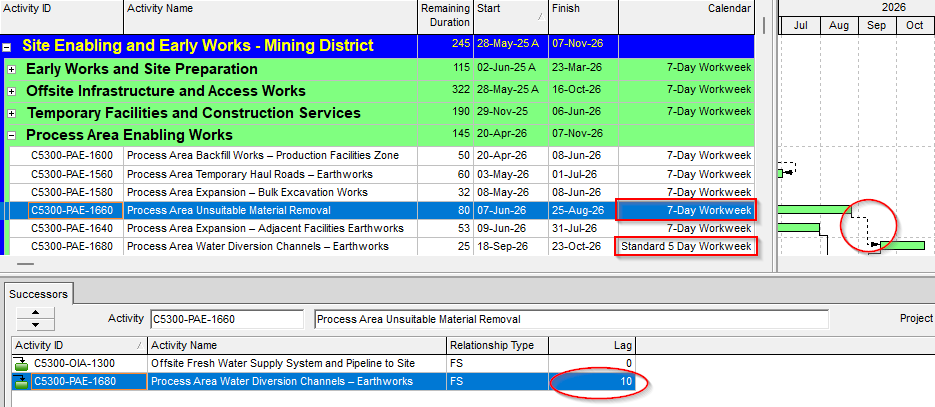
The issue is not limited to five-day or seven-day calendars. Two calendars may have the same number of working days per week but different holidays, shifts, exceptions, or working hours. Those differences can also change the actual effect of the lag on the schedule.
Risks for schedule interpretation
When a relationship with lag connects activities with different calendars, the schedule can become less transparent. The planner may see a lag value, but the resulting dates may not be obvious unless it is clear which calendar P6 is using to calculate it.
This can create several issues:
- differences between the entered lag and the perceived interval in calendar days;
- difficulty explaining why an activity starts or finishes on a specific date;
- risk of inconsistencies if different projects use different lag calculation settings;
- errors when reviewing relationships between activities with shifts, holidays, or special calendars;
- reduced traceability during audits, quality reviews, or schedule analysis.
For this reason, a lag between activities with different calendars requires more attention than a lag between activities that share the same calendar.
Importance of documenting the calendar used to calculate lags
The project scheduling basis should clearly state which calendar is used to calculate relationship lags. This rule should not remain implicit or depend only on the internal configuration of the file.
Documenting this rule allows schedule reviewers to understand how Primavera P6 is interpreting lags. It also makes it easier to compare updates, review contractor schedules, and analyze XER files imported from different databases.
If this setting is not documented, two people may interpret the same lag differently. One may think it represents calendar days, another may assume predecessor working days, and another may be reviewing the schedule under a different configuration. This ambiguity can create unnecessary discussions and control errors.
External relationships marked with [e]
xerPlanner may mark findings with [e] when they are associated with external relationships, meaning relationships between activities that belong to different projects within the XER file.
This mark indicates that the finding depends on the existence of that external relationship. If the XER file is imported into a database where the related external project does not exist, the relationship may disappear and, therefore, the lag causing the finding may also disappear. On the other hand, if the schedule is reviewed or imported into a database where the external project does exist, the relationship remains and the finding is still valid.
In this analysis, the [e] mark is especially relevant because external relationships may connect activities from different projects with different calendars. Therefore, the finding should be reviewed considering both the logic relationship and the availability of the external project in the database where the schedule will be evaluated.
Best practices
The best practice is to review every relationship with a positive lag when the predecessor and successor use different calendars. The planner should confirm what the lag represents, which calendar is being used to calculate it, and whether the resulting dates are consistent with the scheduling intent.
It is also advisable to document in the scheduling basis which setting is used to calculate lags. If the project uses several calendars, special shifts, or relevant holidays, this definition becomes even more important.
When the lag represents a waiting period or condition that must be controlled, it may be better to replace it with an explicit activity. This allows a specific calendar, duration, owner, resources, and clear relationships to be assigned, reducing the ambiguity that appears when the lag remains hidden inside a relationship.
Conclusion
Relationships with positive lags between activities with different calendars require careful review. The same lag value can produce different effects depending on the calendar used to calculate it, especially when there are differences in working days, weekends, holidays, or shifts.
Reviewing these findings helps validate that lags are consistent with the scheduling intent and that the schedule is understandable for those who need to review, update, or audit it. In these cases, it is not enough to see how many days the lag has; it is also necessary to understand which calendar is being used to calculate it.